
Readme
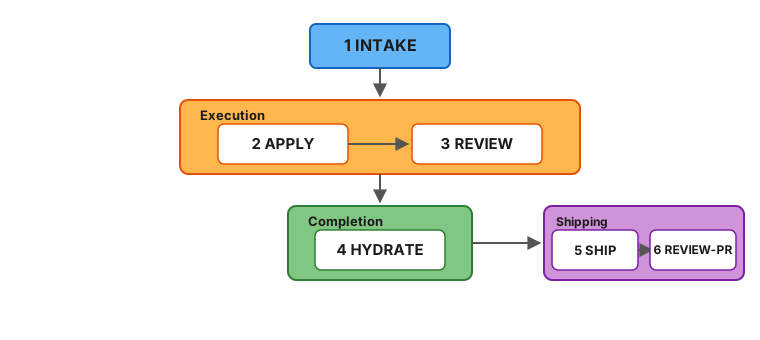
A development toolkit for AI-assisted coding. It includes a 6-stage pipeline (intake → apply → review → hydrate → ship → review-PR), standalone CLI tools for git worktree management (wt) and idea backlogs (idea), and batch orchestration for running multiple AI agents in parallel. Plain markdown prompts, no SDK, no vendor lock-in. Works with Claude Code, Codex, Cursor, and Windsurf.
AI agents write code fast. The bottleneck is now your clarity: did you define the problem well enough? Fab Kit sits at that bottleneck — it forces structured thinking before implementation, grounds every session in your project’s actual context, and gets cheaper to run as agents improve.
Try it now | Understand the concepts | Install guide | Workflows guide | Glossary (new to Fab terminology?)
Contents: The 6 Stages · Prerequisites · Quick Start · Why Fab Kit · The 5 Cs · Commands
The 6 Stages
Every change (a self-contained feature or fix with its own folder) moves through six stages:
Mermaid source
| # | Stage | Purpose | Artifact |
|---|---|---|---|
| 1 | Intake | Capture intent, scope, approach | intake.md |
| 2 | Apply | Co-generate plan.md (requirements + tasks + acceptance) from intake, then execute the tasks | plan.md + code changes |
| 3 | Review | Sub-agent validates against the plan’s requirements and constitution (your project’s architectural rules) | Prioritized findings report |
| 4 | Hydrate | Save learnings into project memory (docs/memory/) | Memory updates |
| 5 | Ship | Commit, push, and create a GitHub PR | Pull request |
| 6 | Review-PR | Triage and fix PR review comments from humans or automated reviewers | Comments addressed |
Each stage produces a persistent artifact or state update. Interrupt anything — re-run the same command to resume. All pipeline skills are idempotent.
Review is performed by a sub-agent running in a separate context - a fresh perspective that validates against both the plan’s requirements and your project constitution. Findings are prioritized (must-fix, should-fix, nice-to-have) and the agent triages them, looping back for automatic rework on the issues that matter most.
A change folder looks like this:
fab/changes/260101-abcd-add-spinner/
├── intake.md        # What you want and why
├── plan.md          # Requirements + tasks + acceptance (generated at apply entry)
└── .status.yaml     # Pipeline state (symlinked as .fab-status.yaml at repo root while this change is active)
Prerequisites
📦 For the full, tool-specific install walkthrough — companion utilities, shell completion, and the new-project / existing-repo / upgrade flows — see the Install guide.
Using Fab Kit
Install with Homebrew (macOS and Linux):
brew tap sahil87/tap
brew install fab-kit

# Other utilities fab depends on
brew install yq jq gh direnv
This installs the fab CLI (router), fab-kit (workspace lifecycle), and standalone tools wt (worktree manager) and idea (backlog manager).
-
After installing
gh, authenticate withgh auth login. -
After installing
direnv, add the hook to your shell. -
Optional — activate shell completion in your shell’s rc file:
eval "$(fab shell-init zsh)" # or bash / fishWorks from any directory (no fab project required). Prefer saving the script to disk? Use
fab completion <shell>instead.
| Tool | Purpose |
|---|---|
| fab-kit | The fab CLI router, workspace lifecycle (init/upgrade-repo/sync), wt, and idea |
| yq | YAML processing for status files and schemas |
| jq | JSON processing for settings merge during sync |
| gh | GitHub CLI - used for releases and PR workflows |
| direnv | Auto-loads .envrc to set workspace environment variables |
Developing Fab Kit
In addition to the above:
brew install go just| Tool | Purpose |
|---|---|
| Go | Required for building binaries from source (src/go/) |
| just | Task runner for build, test, and release recipes |
Quick Start
1. Install
New project
fab initThis downloads the latest release to the system cache, sets fab_version in fab/project/config.yaml, and runs fab sync to deploy skills — all in one step. No curl scripts or manual downloads.
Then in your AI agent:
/fab-setup    # Claude Code
$fab-setup    # Codex
This generates fab/project/constitution.md and other project configuration files. Run fab doctor to verify your setup.
Once setup completes, run /fab-discuss to load project context and orient before your first change.
Onboarding an existing repo with prior docs
If your project already has documentation (Notion pages, Linear specs, READMEs, design docs), bootstrap memory from them before your first change:
-
Initialize the repo:
fab init # new to Fab Kit fab sync # cloning a repo that already uses Fab Kit -
In your AI agent — set up project config:
/fab-setup -
Hydrate memory from your existing docs (or from the codebase itself):
/docs-hydrate-memory <notion-url> <linear-url> ./README.md ./docs/
/docs-hydrate-memory                 # no args → generate from codebase analysis
Accepts Notion/Linear URLs, local
.mdfiles, or folder paths. Safe to re-run — content is merged, not overwritten. -
Propagate memory into structured specs:
/docs-hydrate-specsThis flows memory → specs (the reverse of
hydrate), surfacing gaps where memory covers a topic that specs don’t. Top gaps are previewed for confirmation. -
Orient before your first change:
/fab-discuss
Updating from a previous version
Two steps — one in the terminal, one in your AI agent:
-
In your terminal — bump the kit version and re-sync:
fab upgrade-repo # upgrades to latest version fab upgrade-repo 0.44.0 # upgrades to a specific version -
In your AI agent — apply any data migrations:
/fab-setup migrations    # Claude Code
$fab-setup migrations    # Codex
Safe to re-run — no-op if no migrations are pending.
To re-deploy skills, scaffold structure, and sync hooks without changing the pinned version (useful after cloning):
fab syncNote:
fab syncruns automatically in every new worktree created bywt create.
2. Your first change
🛠️ For a task-oriented walkthrough of driving the pipeline — the per-stage command sequence, the apply⇄review auto-rework loop,
/fab-ffvs/fab-fffvs/fab-proceed, and going parallel with worktrees — see the Workflows guide.
Fab Kit skills are slash commands you type into an AI agent’s chat, not the terminal. Open a session in your project directory:
- Claude Code:
claudein terminal - Codex:
codexin terminal - Cursor / Windsurf: open the project, use the chat panel
Then type the commands below in the agent’s prompt. Each command runs one pipeline stage — the AI generates output in real time, so wait for it to finish before running the next.
# In your AI agent:

# Creation - creates change folder, writes intake.md, activates the change, creates git branch
/fab-new Add a loading spinner to the submit button

# Apply - generates plan.md (requirements + tasks + acceptance) and implements the code, checking off tasks as it goes
/fab-continue
# Review - reviews implementation against the plan's requirements + constitution
/fab-continue
# Hydrate - saves learnings into docs/memory/
/fab-continue

# Ship - commit, push, and create a GitHub PR
/git-pr
# Review-PR - triage and fix PR review comments
/git-pr-review

# Archive - move the change folder out of active changes
/fab-archive
At any point, run /fab-status to see where you are.
For small changes, /fab-ff (fast-forward) runs the pipeline through hydrate in one shot - gated by a single intake confidence score that ensures ambiguity is low enough for safe execution. Both /fab-ff and /fab-fff (full fast-forward) auto-loop between apply and sub-agent review, fixing issues automatically before escalating to you.
3. Going parallel
While AI works on one change, start another in a separate git worktree (an isolated copy of your repo):
# In your terminal:
wt create                # creates an isolated worktree with a random name

# In a new AI agent session in that worktree:
/fab-new Add error toast for failed submissions
Each change is a self-contained folder - multiple AI sessions run in parallel without conflicts. /fab-new auto-activates, so you can start working immediately. Use /fab-draft to queue a change without switching to it. How the assembly line works →
Troubleshooting
Run fab doctor to check all prerequisites (git, yq, direnv hook, etc.) and diagnose common setup issues.
direnv allowdoesn’t work - reload your shell or runeval "$(direnv export zsh)"/fab-setupnot recognized - re-runfab syncto deploy skills- After cloning a repo that uses Fab Kit - run
fab synconce. Agent skills and hooks live in.claude/which is gitignored by default, so each developer needs to deploy them locally. - A stage fails mid-way - run
/fab-continueto resume from the last checkpoint. All stage artifacts are persisted, so no progress is lost. - AI produces bad code - the review sub-agent catches it.
/fab-ffand/fab-fffauto-loop between apply and review (up to 3 cycles) before escalating to you. - Abandon a change - delete the change folder, or run
/fab-archiveto move it to the archive.
Why Fab Kit
AI coding tools give you speed but leave you to manage quality and knowledge yourself. Fab Kit gives you all four:
| Speed | Knowledge | Quality | Autonomy |
|---|---|---|---|
| Parallel changes - never idle | Compounds with every change | Constitution + self-correcting review | Confidence-scored - assumes or asks based on context |
Parallel by Default
  ██ = working    ░░ = idle

              One at a time
              ─────────────

  You    ██░░░░░░░░██░░░░░░░░██░░░░░░░░██░░░░░░░░
  AI     ░░████████░░████████░░████████░░████████

  Create, wait, review. Create, wait, review.
  More waiting than working.

              Assembly line
              ─────────────

  You    ██████░░█████████░██░█████████░██░░░░░░░
  AI     ░░░░░░██████████░████████████░░████████░

  Create a batch, hand off, create the next batch.
  Both always working.
Without Fab, you describe a task, wait while AI works, review, repeat. With Fab, you batch structured changes - each in its own folder and worktree - and create the next batch while AI executes the current one.
Three properties make this work:
- Self-contained change folders - Each change has its own intake, plan, and status. No shared state - parallel changes don’t interfere during development.
- Git worktree isolation - Each change runs in its own worktree. Parallel AI sessions can’t step on each other.
- Resumable pipeline - Every stage produces a persistent artifact. Interrupt anything, resume later.
Shared Memory That Grows With Your Project
Most AI tools give each session a private memory that disappears when the session ends. Fab saves learnings from every completed change into docs/memory/ - a domain-organized knowledge base committed to git and shared with the entire team.
  ┌──────────┐    hydrate     ┌──────────────┐
  │ plan.md  │ ─────────────▶ │ docs/memory/ │
  └──────────┘                └──────┬───────┘
       ▲                             │
       │       context for next      │
       └──────── change ─────────────┘
This creates a self-reinforcing cycle:
- Every change makes the next one better - Design decisions from
plan.mdmerge into memory. Future changes load those files as context, so AI starts with real knowledge of your system instead of guessing. - Team knowledge, not personal notes - Memory lives in git. Every developer and every AI session reads the same source of truth. Onboarding means cloning the repo.
- Bootstrap from existing docs -
/docs-hydrate-memoryingests documentation from Notion, Linear, or local files. The pipeline keeps it current from there. - Structured, not append-only - Memory is organized by domain (
auth/,payments/,users/)./docs-reorg-memoryrestructures as it grows./docs-hydrate-specsupdates spec files with relevant details from memory.
Code Quality as a Guardrail
AI writes code fast. Without structure, it also skips requirements, ignores architectural conventions, and ships the first thing that works. Fab enforces quality through structure, a constitution, and self-correcting review.
        ┌───────────────────────────────┐
        │  fab/project/constitution.md  │
        │    MUST · SHOULD · MUST NOT   │
        └───────────────┬───────────────┘
                        │
  intake → apply ⇄ review → hydrate
             ↑       ↗
             └───────┘
          sub-agent review
          with prioritized
findings- Stages that can’t be skipped - The pipeline requires intake before any code is written. The AI can’t jump straight to implementation. Before code is written, the SRAD framework ensures planning decisions are grounded in context - not silently guessed.
- Project constitution -
fab/project/constitution.mddefines your architectural rules using MUST/SHOULD/MUST NOT. Every plan and review checks against it - not just the change’s requirements. - Review that fixes, not just flags - A sub-agent reviews in a fresh context, returning prioritized findings. The applying agent triages by severity and loops back to the right stage:
| Review finds | Priority | Loops back to | What happens |
|---|---|---|---|
| Requirement mismatch, failing tests | Must-fix | → apply | Unchecks failed tasks in plan.md, re-runs them |
| Missing/wrong tasks | Must-fix | → apply | Regenerates plan.md, re-applies |
| Requirements were wrong | Must-fix | → apply | Updates plan.md’s ## Requirements, regenerates tasks |
| Code quality issue | Should-fix | → apply | Addressed when clear and low-effort |
| Style suggestion | Nice-to-have | - | May be skipped |
/fab-fff and /fab-ff auto-loop between apply and review (up to 3 cycles) - each re-review uses a fresh sub-agent. /fab-ff falls back to interactive rework after exhausting auto-retries. A typical /fab-fff run uses 2-4 agent turns per stage; the sub-agent review spawns a separate context.
The 5 Cs of Quality
Five configuration files shape how AI works in your project. Each answers a different question:
| C | File | Question |
|---|---|---|
| Constitution | fab/project/constitution.md | What are our non-negotiable principles? |
| Context | fab/project/context.md | What are we working with? |
| Code Quality | fab/project/code-quality.md | How should code look when we write it? |
| Code Review | fab/project/code-review.md | What should we look for when we validate? |
| Config | fab/project/config.yaml | What are the project’s factual settings? |
Notice the author-vs-critic split: code-quality.md guides the writing agent during apply - coding standards, anti-patterns, test strategy. code-review.md guides the reviewing sub-agent during review - severity definitions, scope boundaries, rework budget. Different cognitive modes, different concerns, different files.
All five are optional except constitution.md and config.yaml. They live in fab/project/. Run /fab-setup to generate them from scaffolds with sensible defaults.
Structured Autonomy, Not Guesswork
AI tools either ask too many questions or silently assume. Fab uses SRAD - a 4-dimension framework - to decide which to do for each decision point during planning.
Signal strength · Reversibility · Agent competence · Disambiguation type
Each dimension scores how safe it is to assume. The scores aggregate into a confidence grade:
| Grade | What happens |
|---|---|
| Certain | Proceeds silently - deterministic from config/codebase |
| Confident | Proceeds, noted in assumptions summary |
| Tentative | Proceeds with marker - resolvable via /fab-clarify |
| Unresolved | Blocks and asks - too ambiguous to guess |
Grades aggregate into a confidence score that gates /fab-ff. If ambiguity is too high, the pipeline refuses to run and tells you what to clarify - no silent guesswork, no unnecessary interruption. How SRAD works →
Command Quick Reference
Prefix: Use
/fab-*in Claude Code,$fab-*in Codex.
📖 The tables below are a quick reference. For the full, auto-generated command reference — every subcommand, flag, and usage string — see shll.ai/tools/fab-kit/commands.
Pipeline
| Command | Purpose |
|---|---|
/fab-new <description> | Start a new change — creates the intake, activates it, and creates the git branch |
/fab-draft <description> | Create a change intake without activating it (queue for later) |
/fab-continue | Advance to the next stage (or reset to a specific stage) |
/fab-ff | Fast-forward through hydrate — confidence-gated, auto-rework loop |
/fab-fff | Fast-forward further through ship + PR review — same gates as ff |
/fab-clarify | Refine the current artifact — resolve gaps without advancing |
/fab-archive | Archive a completed change (or restore an archived one) |
/fab-proceed | Context-aware orchestrator — detects state, runs setup steps, then delegates to /fab-fff |
Setup & Status
| Command | Purpose |
|---|---|
/fab-setup | Bootstrap fab/ structure, manage config/constitution, apply migrations |
/fab-status | Show current change state — name, branch, stage, checklist, next command |
/fab-switch | Switch active change (or list available changes) |
/fab-help | Show workflow overview and command summary |
/fab-discuss | Load project context for an exploratory discussion session |
Git
| Command | Purpose |
|---|---|
/git-branch | Create or switch to the git branch matching the active change |
/git-pr | Commit, push, and create a GitHub PR |
/git-pr-review | Process PR review comments — triage and fix feedback |
Documentation
| Command | Purpose |
|---|---|
/docs-hydrate-memory [sources...] | Ingest external docs or generate memory from codebase analysis |
/docs-hydrate-specs | Detect gaps between memory and specs, propose additions |
/docs-reorg-memory | Analyze memory files for themes, suggest reorganization |
/docs-reorg-specs | Analyze spec files for themes, suggest reorganization |
Multi-Agent Coordination
The operator (/fab-operator) is a long-running coordination layer that sits in its own tmux pane, observing and directing agents across other panes. It is optional and useful when running multiple agent sessions simultaneously.
| Command | Purpose |
|---|---|
/fab-operator | Multi-agent coordination — monitoring, auto-answering, autopilot queues, dependency-aware spawning |
CLI Subcommands
| Command | Purpose |
|---|---|
fab sync | Repair symlinks, scaffold structure, deploy skills |
fab doctor | Diagnose common setup issues |
fab fab-help | Print workflow overview to terminal |
fab operator | Launch operator in a dedicated tmux tab |
fab batch new | Create worktree tabs from backlog items |
fab batch switch | Open tmux tabs in worktrees for one or more changes |
fab batch archive | Archive multiple completed changes in one session |
Stage Coverage by Command
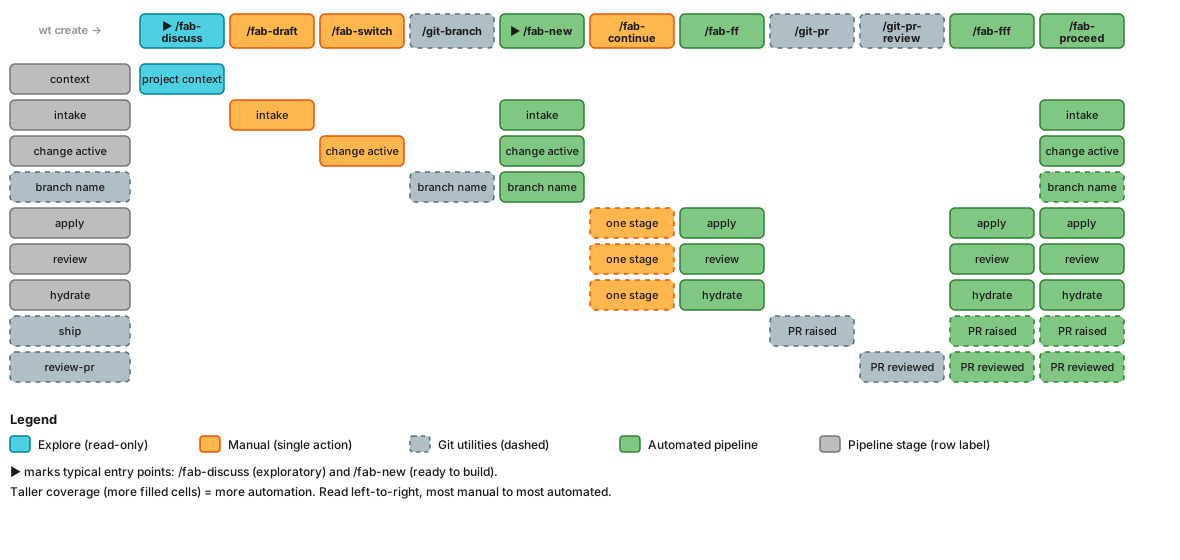
Which pipeline stages each command covers. Taller bars = more automation. Read left-to-right from most manual to most automated. ▶ marks typical entry points — start with /fab-discuss (exploratory) or /fab-new (ready to build). Arrows show the typical path from idea to PR. Dashed borders indicate optional/utility stages. Empty cells = not covered by that command.
| Color | Category | Commands |
|---|---|---|
| 🟦 Cyan | Explore (read-only) | /fab-discuss |
| 🟧 Amber | Manual (single action) | /fab-draft, /fab-switch, /fab-continue |
| ⬜ Blue-grey (dashed) | Git utilities | /git-branch, /git-pr, /git-pr-review |
| 🟩 Green | Automated pipeline (multi-stage) | /fab-new, /fab-ff, /fab-fff, /fab-proceed |
| ◻️ Grey | Fab pipeline stage (row label) | intake, change active, apply, review, hydrate |
| ▶ | Typical entry point | /fab-discuss, /fab-new |
Mermaid source
Quick reference — which stages does each command cover?
| Stage | /fab-discuss | /fab-draft | /fab-switch | /git-branch | /fab-new | /fab-continue | /fab-ff | /git-pr | /git-pr-review | /fab-fff | /fab-proceed |
|---|---|---|---|---|---|---|---|---|---|---|---|
| context | ✅ | ||||||||||
| intake | ✅ | ✅ | ✅ | ||||||||
| change active | ✅ | ✅ | ✅ | ||||||||
| branch name | ✅ | ✅ | ✅ | ||||||||
| apply | ✅ | ✅ | ✅ | ✅ | |||||||
| review | ✅ | ✅ | ✅ | ✅ | |||||||
| hydrate | ✅ | ✅ | ✅ | ✅ | |||||||
| ship | ✅ | ✅ | ✅ | ||||||||
| review-pr | ✅ | ✅ | ✅ |
Companion tools
fab-kit’s Homebrew formula declares wt and idea as dependencies, so brew install sahil87/tap/fab-kit installs all four CLIs (fab, fab-kit, wt, idea) on PATH transitively. They’re independent projects with their own release cadences:
| Tool | Role in the fab workflow | Repo |
|---|---|---|
| wt | Worktree isolation — each change runs in its own worktree (the foundation of parallel changes). Used by fab batch new and fab batch switch. | sahil87/wt |
| idea | Per-repo backlog (fab/backlog.md) that feeds /fab-new. fab batch new reads open ideas and creates a worktree per item. | sahil87/idea |
See companions.md for the integration architecture.
Learn More
- The Assembly Line - batch scripts, Gantt charts, and the full numbers behind parallel development
- Design & Workflow Details - principles, detailed stage descriptions, example workflows
- User Flow Diagrams - visual maps of the full pipeline, shortcuts, rework paths, and state machine
- Full Command Reference - detailed behavior for every
/fab-*skill - SRAD Autonomy Framework - how the pipeline handles ambiguity, confidence scoring, and autonomous execution gates
- Glossary - all Fab terminology defined
- Contributing - developing, extending, and releasing Fab Kit